Change Control Workflow Process
The default change control workflow process uses a set of three predefined forms that are auto populated with selected source data. The change control process assumes you are using BOEMax to maintain a historical archive of the budget changes once the execution phase of the project begins. All control account and subordinate work package changes, including updates for rolling wave planning, are first modeled in BOEMax and once approved, the changes are merged into EVMax to maintain the current budget data. The shared workflow functions ensure these changes to the baseline data are automatically documented using the source data in BOEMax and EVMax.
Change control is a three step closed loop approval process initiated in BOEMax at the control account level. This is illustrated below.
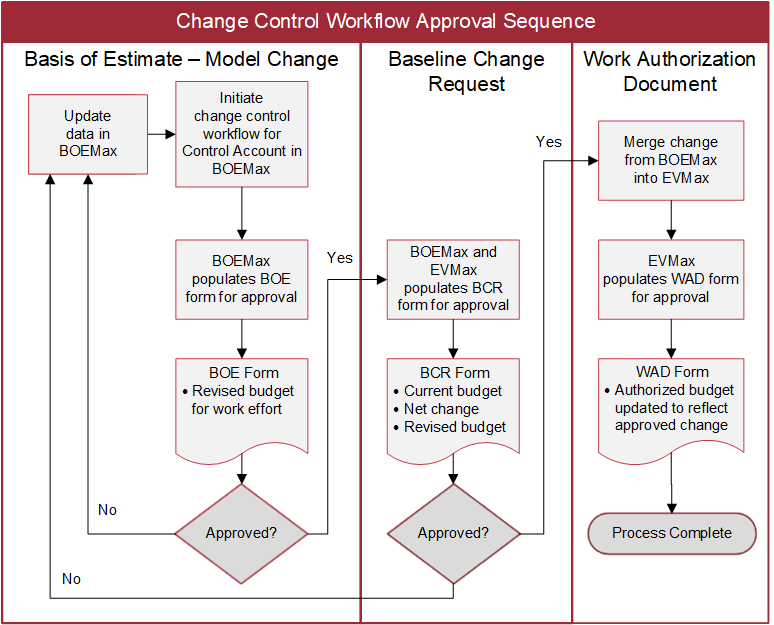
Following the standard change control workflow sequence, users assigned to a specific role review and approve the following predefined forms.
- A basis of estimate (BOE) form in BOEMax initiates the change control workflow process for a specific control account. This form is used to document the reason for the change and the thought process behind the change request. Once approved, the process moves to the next form.
- The baseline change request (BCR) form for the control account is processed next. This form combines data from BOEMax (the proposed change) and EVMax (the current budget) to auto populate the before, after, and net change values in the form. Once the form is approved, the changes are merged from BOEMax into EVMax. The process moves to the next form.
- The work authorization document (WAD) is the last form in the process. The form reflects the approved changes to the control account. Once the control account work authorization is approved, the change control workflow process is complete. The revision number for the control account is automatically incremented.
The basic implementation and process steps are outlined below. For more in-depth steps and notes, see the How To topic Implement the Change Control Process
 Steps to Implement the Change Control Workflow Process
- Create a copy of the proposal project in BOEMax to retain the final proposal submission data in the BOEMax database. Update the data as needed in the new BOEMax project created from the copy process to reflect the contract requirements and period of performance. The objective is to establish the project's original budget baseline in BOEMax as the starting point for recording changes.
- Enable Workflow for a Project in BOEMax. You must be an administrative user to enable the workflow for the project.
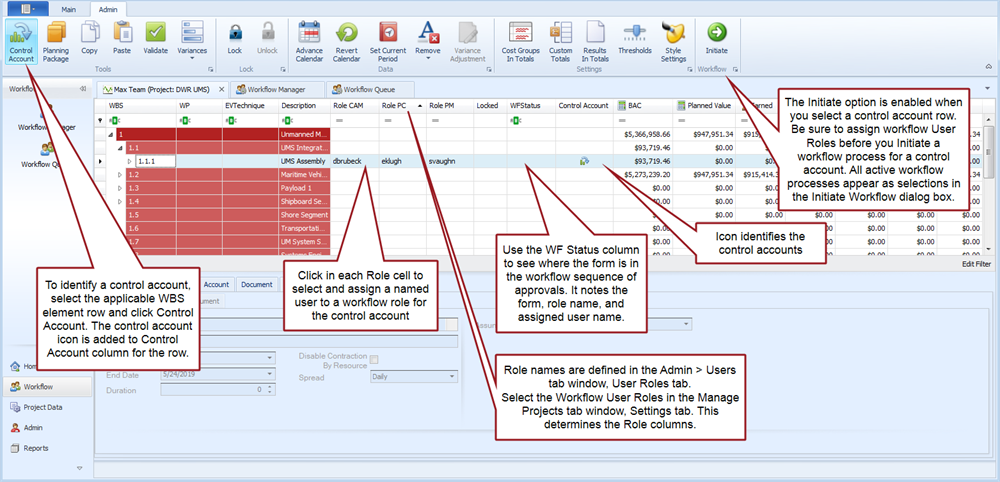
- Identify Control Accounts in BOEMax.
- Assign Workflow Roles in BOEMax.
- Import a Project from BOEMax into EVMax. The import process includes the workflow project level settings and control account workflow role assignments.
- Enter the project's budget base information in EVMax. This includes the contract total cost value, budget set aside as management reserve, and fee or profit, as well as setting the option to enable the budget change log. See Set the Project Budget Base and Enable the Change Control Log. As needed, you can Enter Project Budget Changes to reflect contract modifications to the project's budget base such as the negotiated cost or for authorized unpriced work that needs to be negotiated with customer.
Workflow Process Steps
- In EVMax, you may want to set the default change control debit account to either management reserve or undistributed budget before you process your control account and subordinate work package changes. See Set Budget Change Debit Account.
- In BOEMax, update the estimate/budget data to model the proposed change for the applicable control account.
- While still in BOEMax, Initiate the Workflow Process for the applicable control account row. You must be an authorized user to initiate the workflow process. Select the change control workflow process. The Workflow Queue now includes the BOE form for the control account with data auto populated from BOEMax.
- Each user in the workflow queue reviews the BOE workflow form, enters narrative information or other data as applicable, and approves the form. See Approve a Workflow Form. Once the last person in the queue approves the BOE form, the BCR form is automatically populated.
- The workflow process now transitions to EVMax. Each user in the workflow queue reviews the BCR workflow form, enters the change rationale or other details, and approves the form. Once the last person in the queue approves the BCR form, the work authorization form is automatically populated.
- Merge the approved changes from BOEMax into EVMax. See Merge Data from BOEMax.
- Complete the work authorization approvals in EVMax. Once the last person in the queue approves the form, the change control process for the control account is complete.
Main Estimate Window, Workflow Enabled
Standard View, Admin tab
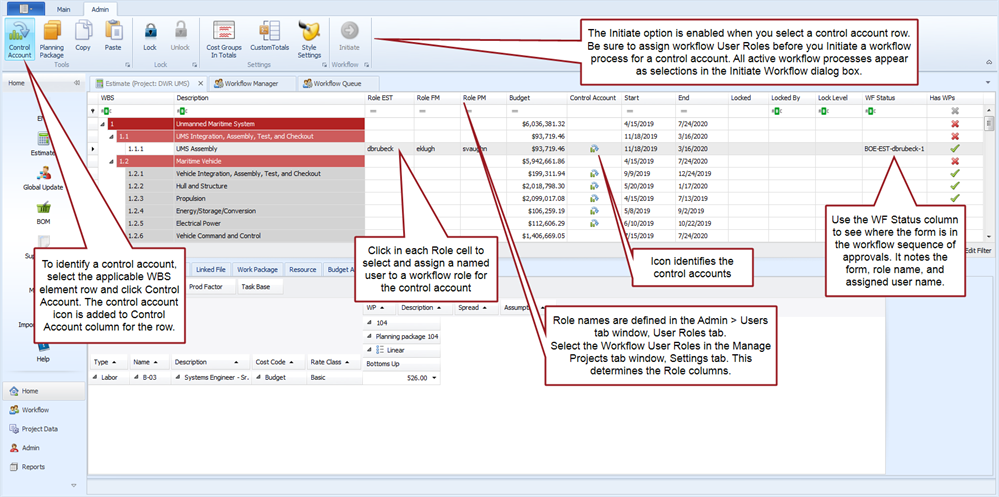
Main EVMax Window, Workflow Enabled
Standard View, Admin tab